
Citations
Insert footnote-style citations into your chapters that link back to your project's citation sources: books, articles, websites, and more.
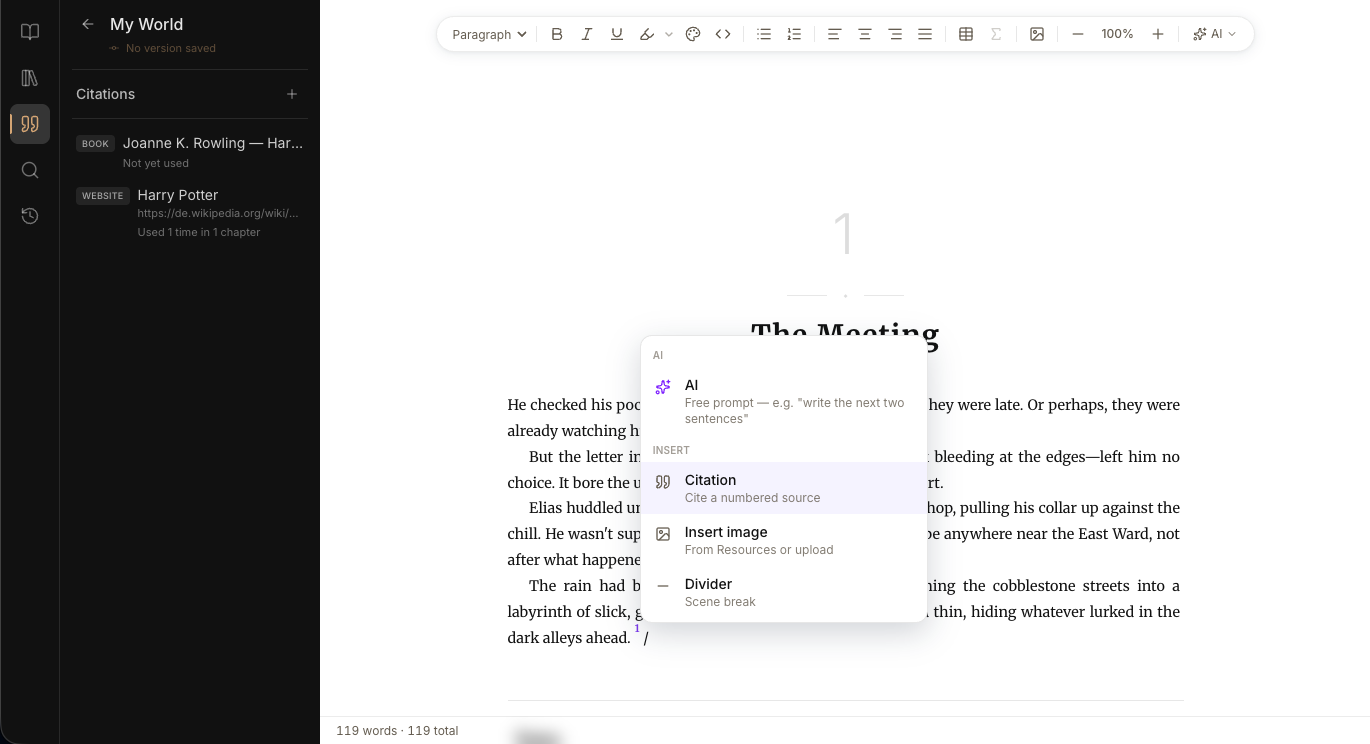
How it works#
Citations are numbered references, printed as endnotes at the end of each chapter, that link sentences in your chapters back to a citation source, such as a book, article, website, or other bibliographic entry. Citations live in two places:
- The Citations sidebar in the activity bar, where you manage the project's citation sources.
- The Editor, where you insert a citation at the cursor that points to one of those sources.
Open the Citations sidebar#
Click the Citations icon in the activity bar. The sidebar lists every citation source in the project, with its type tag, short label, and usage count ("Used 3 times in 2 chapters" or "Not yet used").
Add a citation source#
- Click the + icon at the top of the Citations sidebar.
- Pick a citation type (book, article, website, and so on).
- Fill in the fields: title, authors, year, URL, page numbers, and other type-specific details.
- Click Add source.
Insert a citation in a chapter#
- In the Editor, put the cursor where the citation should appear (usually right after a sentence or fact).
- Open the citation picker from the editor toolbar or via the Slash menu.
- Search by title, author, URL, or journal in the picker.
- Click a source to select it, then click Insert.
If you don't have the right citation source yet, click New source in the picker. You'll fill in the same form as in the sidebar, and the new source is selected for you.
Edit a citation source#
Hover the row in the Citations sidebar and open the ⋯ menu, then choose Edit. The form opens with the existing values; change what you need and click Save changes.
Edits propagate everywhere the source is cited.
Delete a citation source#
Open the ⋯ menu and choose Delete.
Limitations#
- Citation sources are managed at the Project level. They aren't shared between Projects.
- Deletion of a source is blocked while it is referenced by at least one chapter.
- Removing a citation from a chapter is done in the Editor; the source itself remains in the sidebar.