Export
Produce a file from your Project: print-ready PDF for paperback, reflowable EPUB for e-readers, editable Word for your editor.
How it works#
Chaptora exports a full Project to one of three formats:
- PDF: print-ready, with the exact trim size and margins configured on the Project. Pages are fixed-layout, so headings, page breaks, and chapter endnotes all sit where you'd expect on paper. Available on every plan. Octavo adds a Chaptora cover page; Quarto and Folio export without it.
- EPUB: reflowable for e-readers (Kindle, Apple Books, Kobo). The text re-wraps to fit the reader's screen and font preference. Available on Quarto and Folio.
- Word (DOCX): an editable file to hand to an editor, proofreader, or formatter. It carries your book layout, so a PDF saved from Microsoft Word is still a printable book. Available on Quarto and Folio.
All three formats include the Body chapters in order, plus any enabled Front matter (Copyright, Dedication, Epigraph, TOC, Foreword, Preface, Acknowledgments) and Back matter (Notes, Bibliography, About the Author, Also by Author).
Export your book#
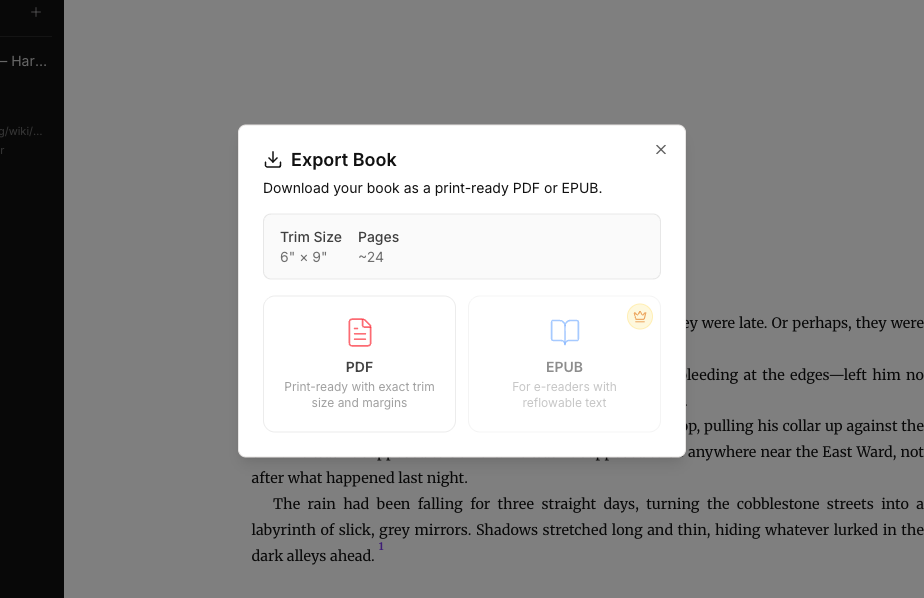
- From inside your Project, open the Export Book dialog from the project menu.
- Review the Trim Size and the ~Pages estimate (a rough page count based on your word count and trim size).
- Click PDF, EPUB, or Word.
- The file downloads automatically. The filename is derived from your project name.
PDF: print-ready#
The PDF uses the trim size set in Project Settings (e.g., 5 × 8", 6 × 9"). It includes headers, footers, and page numbers. Chapter titles, headings, and inline formatting are rendered with Chaptora's book typography.
Use the PDF when:
- You're uploading to Amazon KDP, IngramSpark, BookBaby, or any print-on-demand service.
- You want a proof copy for revisions.
- You need a final fixed-layout file for archival.
EPUB: for e-readers#
The EPUB is reflowable: readers can change font size, line height, and theme, and the text reflows to fit. Embedded fonts, images, and citation endnotes are preserved.
Use the EPUB when:
- You're uploading to Amazon KDP, Apple Books, Kobo, or other e-reader stores.
- You want to read your own draft on a Kindle or iPad.
EPUB export is included in Quarto and Folio. On Octavo, the EPUB card is unavailable and marked with a crown icon. Upgrade to Quarto or Folio to enable EPUB export. See Pricing for the current plans.
Word: for your editor#
The Word file is made for editing. Chapter titles, headings, body text, and quotes use real Word paragraph styles, so your editor can work with tracked changes and a formatter can import the file through its styles. It also carries the layout of your book:
- The page size is your trim size, with mirrored margins and the gutter on the spine side.
- Your font is embedded, so the book looks the same on a computer that doesn't have it installed.
- Every chapter starts on a right-hand page. Front matter is numbered in roman numerals, and the chapters start again at 1.
- Citations become Word endnotes, numbered per chapter and listed at the end of each chapter under "Notes". Word keeps the numbers correct when your editor moves or deletes a cited sentence.
- Formulas become Word equations. A formula that can't be converted appears as its LaTeX source.
- The generated text, such as the Copyright page and the Table of Contents title, is in your book's language, the same as in the PDF.
Open the file in Microsoft Word. Word computes the page breaks and the Table of Contents page numbers, so the pages can differ from the Chaptora PDF. When Word asks whether to update the fields in the document, choose Yes. LibreOffice usually keeps the layout too. Google Docs and Apple Pages drop parts of it, such as the mirrored margins, the right-hand chapter starts, and the embedded font.
The Word file is a one-way handoff. Changes made in Word don't flow back into your Project, so carry your editor's changes over into your chapters by hand. Drop caps are left out of the Word file, even when they're enabled, because they break easily under tracked changes.
Word export is included in Quarto and Folio. On Octavo, the Word card is marked with a crown icon.
Limitations#
- Export bundles the entire Project at once. Selective chapter export isn't available.
- The page estimate in the dialog is a rough projection. Actual page count depends on font, trim size, and image layout.
- Plain text, Markdown, and other formats aren't supported. PDF, EPUB, and Word only.
- A Word file can't be imported back into an existing Project.